
No need to Swipe Right
I think we’re a perfect match. Let's design, build and create beautiful experiences together.
Talk Design Over Chai?

A cat person

Photography
Hi, it's me :)
Project Overview
Custom orders were messy, spread across spreadsheets, Slack, and endless emails.
Teams tried their best but lacked a single source of truth, which led to confusion and delays.
Customers were left waiting as timelines slipped again and again.
Problems
Scattered Communication
Teams juggled Slack, Notion, WhatsApp, and emails causing misalignment and missed updates.
No Order Visibility for Customers
Design dreams one thing, dev delivers another. Let’s build that missing common ground & avoid further.
Manual Tracking = Chaos
Orders were manually entered into external systems like Printful, with no live sync or automated tracking.
Team Silos
Designers, Sales, Operations, and Fulfillment worked on disconnected tools leading to delays, rework.
Solution
One Dashboard, Total Visibility
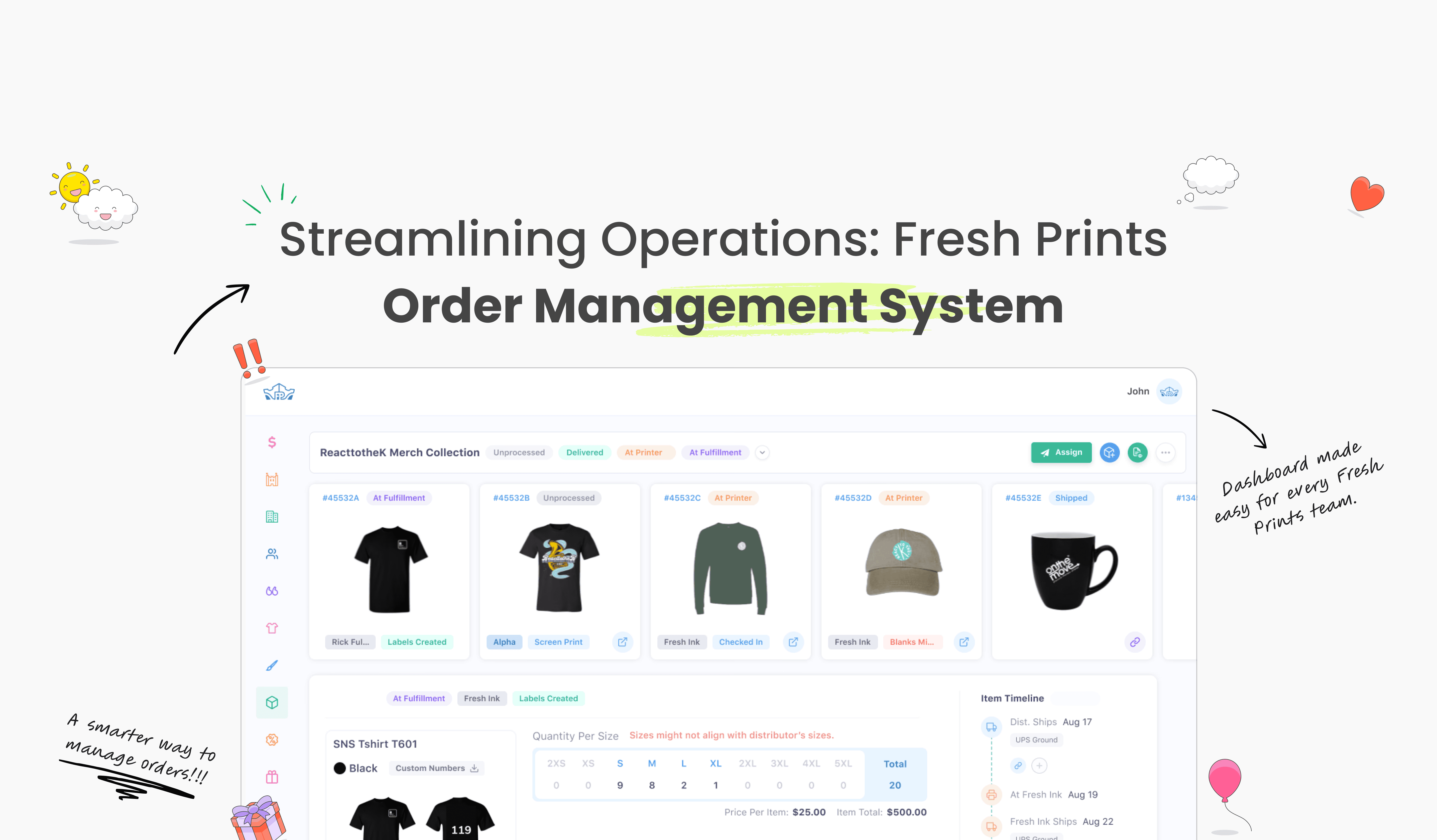
We unified all tools into a single dashboard. Everyone sales, design, production, can now track progress in real time. Clear updates, fewer delays.
Seamless Customer Sync
Customers now get automatic status updates. No more blind spots, no more “Where’s my order?” just clarity and confidence at every step.
Key Impacts
40%
Reduced average update turnaround time
60%
Cut manual check-ins across teams
26%
Increased customer satisfaction with clear order timelines
32%
Unified 5 teams under a single workflow, improving operational clarity
Design Tradeoffs

Chose Centralization vs Tool Flexibility — Moved order tracking into a single system, limiting team-specific tools but reducing confusion and delays.

Chose Internal Clarity vs Custom Views — Prioritized a consistent internal workflow before exposing advanced, customizable views.

Chose Automation vs Manual Control —
Reduced spreadsheet-based tracking to minimize errors, accepting less granular manual intervention.
Here's What I Did As A Designer:
Started by analyzing existing order workflows and talking to stakeholders to understand pain points.
Mapped the entire order journey from creation to fulfillment, figuring out where things got stuck.
Feature - 1
Unified Order Timeline: Visual tracker for each order across departments.
Status Progression: Clearly defined stages: Design > Production > Fulfillment
Delivery Estimates: Auto-updated ETAs with alerts for delays

Features - 3
Team Progress Overview: Cross-department progress board
Customer Tracking Link: Real-time view for clients
Bottleneck Flags: Highlights blocked or stuck orders

Features - 2
Task Assignment: Drag-and-drop task ownership
Production Logs: Historical order changes + who made them
Urgency Labels: Prioritize by deadline, delay, or rework

Designing for Effortless Interactions
Redesigned the internal dashboard to reduce friction, accelerate task completion, and support scale without compromising usability.
01
Reduced Time-to-Action
Optimized task flows enabled users to complete core actions twice as fast as before.
02
Fewer Clicks, Higher Efficiency
Simplified navigation and CTA prioritization reduced average clicks per task by 43%.
03
Boosted Completion Rates
Enhanced layout and structure improved task success rates by 21% in testing.
My Growth as a designer

Power of Restraint
Every addition demanded a subtraction. The hardest part was saying no so the system could breathe.
Time as a Material
A system saves time, but building it taught me, time itself is a hidden design element, and it makes it easier.
Figma to Code
learned the toughest part wasn’t designing tokens, but mapping them into reusable, trustworthy code.
Versioning is Design Too
I learned a design system needs versioning, without branches and changelogs.
If you liked that, you’ll probably love these too!
Project Overview
Custom orders were messy, spread across spreadsheets, Slack, and endless emails.
Teams tried their best but lacked a single source of truth, which led to confusion and delays.
Customers were left waiting as timelines slipped again and again.
Problems
Scattered Communication
Teams juggled Slack, Notion, WhatsApp, and emails causing misalignment and missed updates.
No Order Visibility for Customers
Design dreams one thing, dev delivers another. Let’s build that missing common ground and avoid further.
Manual Tracking = Chaos
Orders were manually entered into external systems like Printful, with no live sync or automated tracking.
Team Silos
Designers, Sales, Operations, and Fulfillment worked on disconnected tools leading to delays, rework.
Solution
One Dashboard, Total Visibility
We unified all tools into a single dashboard. Everyone sales, design, production, can now track progress in real time. Clear updates, fewer delays.
Seamless Customer Sync
Customers now get automatic status updates. No more blind spots, no more “Where’s my order?” just clarity and confidence at every step.
Key Impacts
40%
Reduced average update turnaround time
60%
Cut manual check-ins across teams
26%
Increased customer satisfaction with clear order timelines
32%
Unified 5 teams under a single workflow, improving operational clarity
Design Tradeoffs
Chose Centralization vs Tool Flexibility — Moved order tracking into a single system, limiting team-specific tools but reducing confusion and delays.
Chose Internal Clarity vs Custom Views — Prioritized a consistent internal workflow before exposing advanced, customizable views.
Chose Automation vs Manual Control —
Reduced spreadsheet-based tracking to minimize errors, accepting less granular manual intervention.
Feature - 1
Unified Order Timeline: Visual tracker for each order across departments.
Status Progression: Clearly defined stages: Design > Production > Fulfillment
Delivery Estimates: Auto-updated ETAs with alerts for delays
Features - 2
Task Assignment: Drag-and-drop task ownership
Production Logs: Historical order changes + who made them
Urgency Labels: Prioritize by deadline, delay, or rework
Features - 3
Team Progress Overview: Cross-department progress board
Customer Tracking Link: Real-time view for clients
Bottleneck Flags: Highlights blocked or stuck orders
Designing for Effortless Interactions
Redesigned the internal dashboard to reduce friction, accelerate task completion, and support scale without compromising usability.
01
Reduced Time-to-Action
Optimized task flows enabled users to complete core actions twice as fast as before.
02
Fewer Clicks, Higher Efficiency
Simplified navigation and CTA prioritization reduced average clicks per task by 43%.
03
Boosted Completion Rates
Enhanced layout and structure improved task success rates by 21% in testing.
My Growth as a designer
Power of Restraint
Every addition demanded a subtraction. The hardest part was saying no so the system could breathe.
Time as a Material
A system saves time, but building it taught me, time itself is a hidden design element, and it makes it easier.
Figma to Code
learned the toughest part wasn’t designing tokens, but mapping them into reusable, trustworthy code.
Versioning is Design Too
I learned a design system needs versioning, without branches and changelogs.
If you liked that, you’ll probably love these too!
Project Overview
Custom orders were messy, spread across spreadsheets, Slack, and endless emails.
Teams tried their best but lacked a single source of truth, which led to confusion and delays.
Customers were left waiting as timelines slipped again and again.
Problems
Scattered Communication
Teams juggled Slack, Notion, WhatsApp, and emails causing misalignment and missed updates.
No Order Visibility for Customers
Design dreams one thing, dev delivers another. Let’s build that missing common ground & avoid further.
Manual Tracking = Chaos
Orders were manually entered into external systems like Printful, with no live sync or automated tracking.
Team Silos
Designers, Sales, Operations, and Fulfillment worked on disconnected tools leading to delays, rework.
Solution
One Dashboard, Total Visibility
We unified all tools into a single dashboard. Everyone sales, design, production, can now track progress in real time. Clear updates, fewer delays.
Seamless Customer Sync
Customers now get automatic status updates. No more blind spots, no more “Where’s my order?” just clarity and confidence at every step.
Key Impacts
40%
Reduced average update turnaround time
60%
Cut manual check-ins across teams
26%
Increased customer satisfaction with clear order timelines
32%
Unified 5 teams under a single workflow, improving operational clarity
Design Tradeoffs
Chose Centralization vs Tool Flexibility — Moved order tracking into a single system, limiting team-specific tools but reducing confusion and delays.
Chose Internal Clarity vs Custom Views — Prioritized a consistent internal workflow before exposing advanced, customizable views.
Chose Automation vs Manual Control —
Reduced spreadsheet-based tracking to minimize errors, accepting less granular manual intervention.
Here's What I Did As A Designer:
Started by analyzing existing order workflows and talking to stakeholders to understand pain points.
Mapped the entire order journey from creation to fulfillment, figuring out where things got stuck.
Feature - 1
Unified Order Timeline: Visual tracker for each order across departments.
Status Progression: Clearly defined stages: Design > Production > Fulfillment
Delivery Estimates: Auto-updated ETAs with alerts for delays
Features - 2
Task Assignment: Drag-and-drop task ownership
Production Logs: Historical order changes + who made them
Urgency Labels: Prioritize by deadline, delay, or rework
Features - 3
Team Progress Overview: Cross-department progress board
Customer Tracking Link: Real-time view for clients
Bottleneck Flags: Highlights blocked or stuck orders
Designing for Effortless Interactions
Redesigned the internal dashboard to reduce friction, accelerate task completion, and support scale without compromising usability.
01
Reduced Time-to-Action
Optimized task flows enabled users to complete core actions twice as fast as before.
02
Fewer Clicks, Higher Efficiency
Simplified navigation and CTA prioritization reduced average clicks per task by 43%.
03
Boosted Completion Rates
Enhanced layout and structure improved task success rates by 21% in testing.
My Growth as a designer
Power of Restraint
Every addition demanded a subtraction. The hardest part was saying no so the system could breathe.
Time as a Material
A system saves time, but building it taught me, time itself is a hidden design element, and it makes it easier.
Figma to Code
learned the toughest part wasn’t designing tokens, but mapping them into reusable, trustworthy code.
Versioning is Design Too
I learned a design system needs versioning, without branches and changelogs.
If you liked that, you’ll probably love these too!
No need to Swipe Right
I think we’re a perfect match. Let's design, build and create beautiful experiences together.
Talk Design Over Chai?
A cat person
Photography
Hi, it's me :)